> 关于 Decentraland 的总体概览
# Decentraland 101
## 入门指南
我该如何进入 Decentraland?
**在桌面端:**
1. 第一步是在你的电脑上下载 Decentraland 应用。前往下载页面 [这里](https://decentraland.org/download?utm_org=dcl\&utm_source=decentraland\&utm_medium=organic\&utm_campaign=evergreen\&utm_term=generaldocs\&utm_content=faq).
2. 当你在电脑上成功安装并启动 Decentraland 后,系统会要求你登录你的 Decentraland 账户;这一过程在线进行,因此你会看到浏览器窗口打开。
3. 通过连接你的 Google 或 Discord 账号,或其他社交资料,或像 MetaMask、Coinbase 这样的数字钱包,创建并登录你的 Decentraland 账户。查看以下教程: [使用社交资料创建账户](https://www.youtube.com/watch?v=ylZrPisyPl4) 或 [使用像 MetaMask 这样的外部钱包](https://www.youtube.com/watch?v=w3CCVrVe1M4).
4. 在线验证完成后,打开电脑上的 Decentraland 应用窗口并点击“Jump Into Decentraland”。
5. 你已经进入了!在这里,你可以点击背包图标自定义你的头像,四处探索 Decentraland 由社区打造的世界,或者参加一场 [活动](https://decentraland.org/events?utm_org=dcl\&utm_source=generaldocs\&utm_medium=organic\&utm_content=faq) 结交一些朋友。祝你玩得开心!
**在移动端:**
1. 从以下位置下载 Decentraland 应用: [App Store(iOS)](https://apps.apple.com/app/decentraland/id6478403840?utm_source=docs\&utm_medium=internal\&utm_content=ios) 或 [Google Play(Android)](https://play.google.com/store/apps/details?id=org.decentraland.godotexplorer\&pcampaignid=web_share\&utm_source=docs\&utm_medium=internal\&utm_content=android).
2. 打开应用,并使用你偏好的登录方式登录你的 Decentraland 账户——社交资料(Google、Discord 等)或数字钱包。你可以使用与桌面端相同的账户,因此你的头像、库存、好友和进度都会随你一同保留。
3. 你已经进入了!请查看 [移动端入门](/docs/player/player-zh/yi-dong-ying-yong/getting-started/) 了解首次使用的操作流程。
使用 Decentraland 需要加密货币或数字钱包吗?
不需要,使用 Decentraland 不必持有加密货币,也不需要事先拥有数字钱包。Decentraland 可免费使用,如果你想从 [Marketplace](https://market.decentraland.org/)购买某些内容,除了加密货币外,你还可以使用信用卡/借记卡。
查看以下教程: [使用社交资料创建账户](https://www.youtube.com/watch?v=ylZrPisyPl4) 或 [使用像 MetaMask 这样的外部钱包](https://www.youtube.com/watch?v=w3CCVrVe1M4).
在 Decentraland 中,用户真正拥有自己的数字资产,例如 Wearables 或 NAME,所有权会记录在区块链上。为实现这一点,每个 Decentraland 账户都关联着一个唯一的数字钱包。不过,如果你还没有数字钱包,也不需要自己去申请。如果你使用 Google 或 Discord 等社交账号登录 Decentraland,系统会在后台为你的账户创建一个数字钱包,所以你无需担心任何事情。
运行 Decentraland 需要什么硬件?
Decentraland 可在 PC(Windows 和 Mac)以及移动设备(iOS 和 Android)上使用。为确保 Decentraland 流畅运行,最低硬件配置如下:
**Windows**
| | 最低要求 | 推荐设置 |
| ---- | ------------------------------------------------------ | --------------------------------------- |
| 操作系统 | Windows 10 64 位 | Windows 11 64 位 |
| CPU | Intel i5 第7代或 AMD Ryzen 5 系列 | Intel i7 第12代或 AMD Ryzen 7 系列 |
| GPU | Nvidia RTX 20 系列或 AMD Radeon RX 5000 系列(兼容 DirectX 12) | Nvidia RTX 30 系列或 AMD Radeon RX 6000 系列 |
| 显存 | 6 GB | 12 GB |
| 内存 | 16GB | 32 GB |
| 存储 | 8GB HDD | 20GB SDD |
**Mac**
| | 最低要求 | 推荐设置 |
| ---- | ------------------------- | ------------------------ |
| 操作系统 | macOS 11 Big Sur | macOS 12 Monterey |
| CPU | Apple M1 | Apple M1 Pro/M2 |
| GPU | Apple M1 集成显卡(需要支持 Metal) | Apple M1 Pro/M2 Pro 集成显卡 |
| 显存 | 6 GB | 12 GB |
| 内存 | 16GB | 32 GB |
| 存储 | 8GB HDD | 20GB SDD |
> [!NOTE]
> 以下移动设备硬件目标截至 2026 年 4 月准确,随着应用演进可能会有所调整。
**Android**
| | 最低要求 | 推荐设置 |
| ---- | ------------------------ | ---------------------- |
| 操作系统 | Android 12 | Android 13 或更高版本 |
| 设备 | Samsung Galaxy A53 或同等机型 | Samsung Galaxy A54 或更高 |
| 内存 | 4 GB | 6 GB 或更多 |
**iOS**
| | 最低要求 | 推荐设置 |
| ---- | --------------------- | --------------- |
| 操作系统 | iOS 18 | iOS 18 或更高版本 |
| 设备 | iPhone 13 / SE(第 3 代) | iPhone 14 或更高版本 |
从以下位置获取移动应用: [App Store(iOS)](https://apps.apple.com/app/decentraland/id6478403840?utm_source=docs\&utm_medium=internal\&utm_content=ios) 或 [Google Play(Android)](https://play.google.com/store/apps/details?id=org.decentraland.godotexplorer\&pcampaignid=web_share\&utm_source=docs\&utm_medium=internal\&utm_content=android)。参见 [移动端上的 Decentraland](/docs/player/player-zh/yi-dong-ying-yong/mobile-app/) 了解更多详情。
我如何探索和导航 Decentraland?
Decentraland 由开放、可通行的 **Genesis City** 组成,这些社区地块通过坐标来标识(例如,Genesis Plaza,Decentraland 的中央默认出生点是 0,0),以及独立的 **Worlds**,即 Decentraland 生态系统中更私密的 3D 空间,可传送进入。
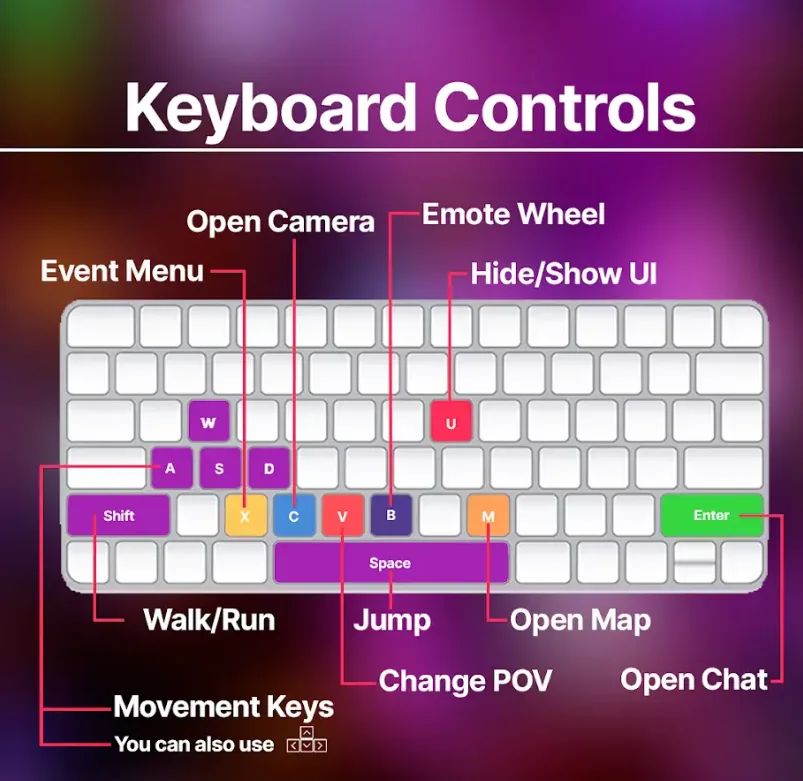
要探索 **Genesis City**,你可以使用方向键或 WASD 键四处移动,点击地图上的位置跳转过去,或者在聊天框中输入以下命令并按“Enter”进行传送:
• `/goto x,y` (x,y 是某个场景的坐标)
要传送到特定的 **World**,你也可以使用聊天命令:
• `/goto World'sName`
如何在 Marketplace 中获取 Wearables、Emotes、LAND 和 NAME?
准备好在 [Marketplace](https://decentraland.org/marketplace/)中开启你的 Decentraland 购物之旅了吗?浏览数百件社区制作的 Wearables 和 Emotes,定制你的数字身份,购买或租赁 Genesis City 的 LAND 地块,或领取你独一无二的 NAME(还会附带你自己的 World!)。
一旦你找到想购买的物品,就可以轻松使用银行卡或多种加密货币支付。如果你购买的是 Wearable 或 Emote,该物品会在几分钟内出现在你的背包中,而且你还能为支持 Decentraland 创作者而感到开心,因为他们可保留 97.5% 的销售额!
你在 Marketplace 购买的任何物品都真正属于你,所有权记录在区块链上。你可以随时转售这些物品,同时原始创作者也会获得 2.5% 的版税分成。
我怎样在 Decentraland 结识他人?
在 Decentraland 结识新朋友的最佳方式是参加 [活动](https://decentraland.org/events?utm_org=dcl\&utm_source=generaldocs\&utm_medium=organic\&utm_content=faq) 并开始聊天!浏览活动页面查看当前和即将举行的活动,进入后别害羞,Decentraland 的社区以热情友好著称。💜
留意每周的导览和聚会,例如 ABC DCL - Adventures of Decentraland,它们专门面向新社区成员!
我如何了解世界内活动?
Decentraland 的 [活动页面](https://decentraland.org/events?utm_org=dcl\&utm_source=generaldocs\&utm_medium=organic\&utm_content=faq) 是社区中任何人都可以发布其世界内活动并邀请大家参加的官方平台。若想及时掌握活动信息,请定期查看活动页面,你也可以在社交渠道关注 Decentraland,例如 [X](https://x.com/decentraland),或者 [订阅](https://decentraland.beehiiv.com/) 每周通讯,了解即将到来的活动!
我如何在世界内拍照?
如果你想记录在 Decentraland 中最喜欢的瞬间,只需按键盘上的 C 键打开相机。屏幕右下角有一份相机控制指南可供参考。
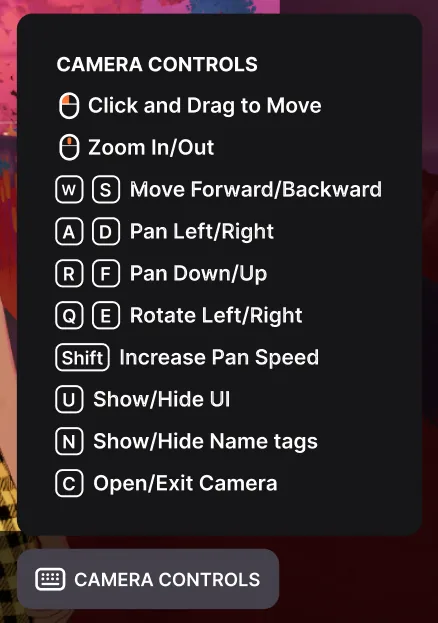
你的图库最多可容纳 500 张照片,你可以轻松通过链接分享图片,或将它们下载到电脑上。
> [!NOTE]
> **小贴士:** 通过在所选照片右上角的三点菜单中切换“设为公开”选项,你可以把最喜欢的照片展示在你的 Decentraland 个人资料上。
我如何参与 Decentraland 治理?
Decentraland 的 DAO 是这个由社区驱动的世界治理核心。入门时,你可以阅读 [DAO 论坛](https://decentraland.org/governance) 了解当前议题、查看社区共识,并添加你自己的评论。更多信息请参见 [DAO 官方页面](https://decentraland.org/dao/).
## 基础知识
什么是 Wearables?
Wearables 是你可以组合搭配以自定义头像外观的数字资产。它们包括服装、配饰、身体部件以及整套皮肤。
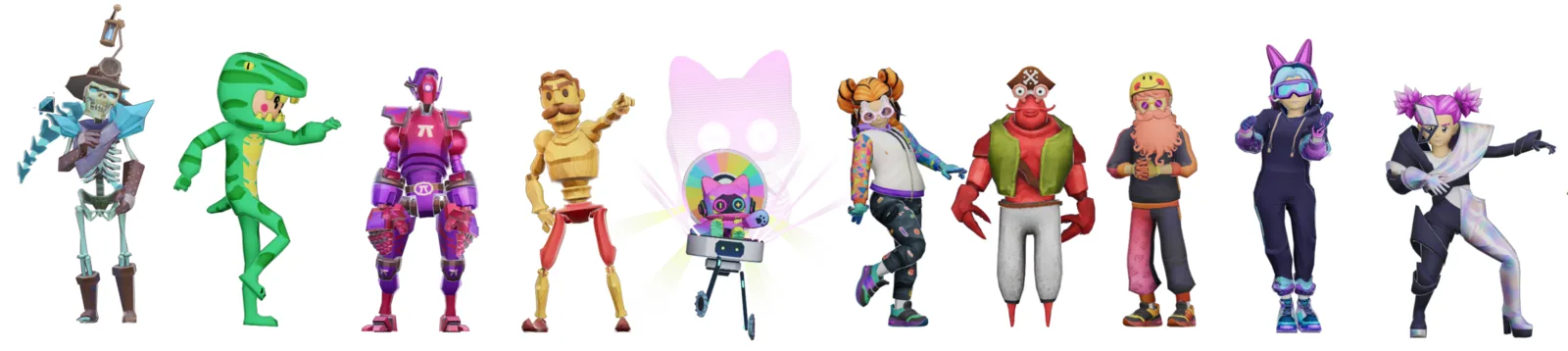
你的背包中始终提供多种免费的基础 Wearables(当你在世界内时,点击左侧的背包图标即可试穿!),你还可以在 [Marketplace](https://decentraland.org/marketplace/browse?section=wearables\&vendor=decentraland\&page=1\&sortBy=newest\&status=on_sale) 浏览成千上万件社区制作的物品,打造你的独特造型。找不到你想要的?不妨自己制作。
什么是 Emotes?
Emotes 是一种动画,让你的头像可以表达反应、跳舞,或进行瑜伽、绘画等活动。与 Wearables 一样,所有人都可使用一组免费的基础 Emotes,但你也可以浏览 [Marketplace](https://decentraland.org/marketplace/browse?assetType=item\§ion=emotes\&vendor=decentraland\&page=1\&sortBy=recently_listed\&status=on_sale) 以找到更多样的选择。或者自己制作!
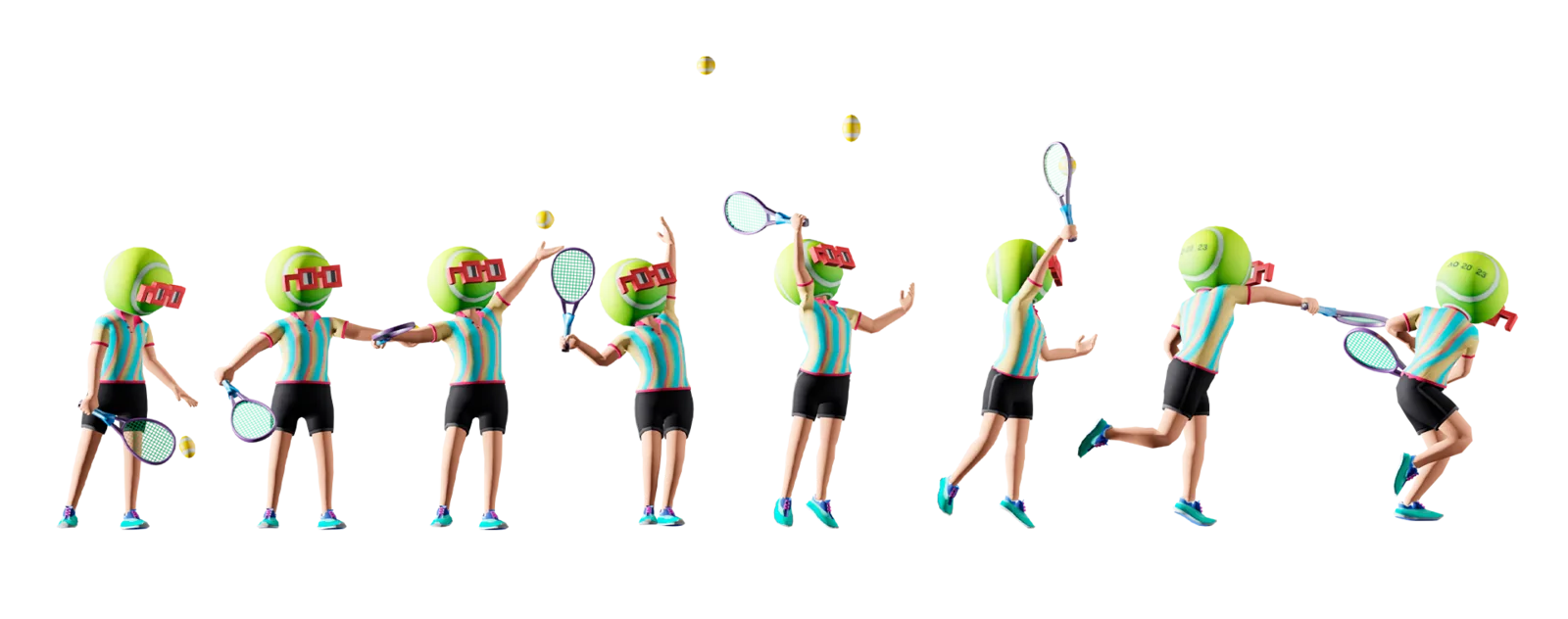
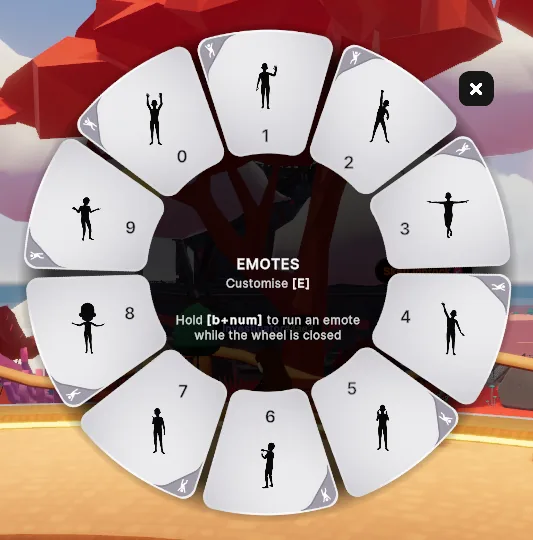
要在 Decentraland 中使用 Emotes,你需要先熟悉下图所示的表情轮。它展示了你最可能使用的 10 个 Emotes(你可以在背包中自定义这些 Emote 槽位)。
触发 Emote 有 3 种方式:
* **初级:** 点击屏幕左下角跳舞人物的图标打开表情轮,然后点击你想使用的 Emote
* **中级:** 按下 **B** 即可在键盘上打开表情轮并点击你想使用的 Emote
* **高级:** 使用快捷键 **B** + 你想使用的 Emote 的编号(例如 **B1**)即可在不打开表情轮的情况下触发 Emote
什么是 NAME?
Decentraland NAME 就像是你头像的官方用户名,由你在区块链上拥有。当你看到其他头像的名称末尾没有类似“#1234”的内容时,那是因为他们已经为自己的头像装备了 NAME。
拥有 Decentraland NAME 还会带来一些额外福利:除了让你的头像更具独特辨识度外,每个 NAME 都附带一个 World——属于你的个人虚拟空间,可用于尝试搭建或举办自己的聚会。你拥有的每个 NAME 还会为你提供 100 VP(投票权),可用于 [DAO 治理](https://dao.decentraland.org/)。Decentraland NAME 也是 ENS 网络的一部分,因此你可以在整个 Web3 中使用你的 NAME。
[立即领取你独一无二的 NAME](https://decentraland.org/marketplace/names/claim) ,或者先查看一个 [实用教程](https://www.youtube.com/watch?v=OKqXmO5fD0s\&ab_channel=Decentraland) 。
一旦你领取了 NAME,请在以下位置将它分配给你的头像: [decentraland.org/builder/names](https://decentraland.org/builder/names).
什么是 MANA?
[**MANA**](https://etherscan.io/token/decentraland) 是 Decentraland 的同质化 ERC20 加密货币代币。MANA 可用于购买 LAND 地块、NAME 和其他数字资产,也可在 Decentraland 生态系统内兑换各种商品和服务。若想查看总供应量和流通量等关键数据的最新摘要,请访问 [**MANA 代币信息**](https://governance.decentraland.org/transparency/) 透明度仪表板。
什么是 LAND?
LAND 是一种保存在以太坊智能合约中的非同质化数字资产。LAND 地块构成了 Decentraland Genesis City 的地图,并通过唯一的 x,y 坐标来标识。每个 LAND 代币都包含其坐标、所有者,以及一个内容描述文件或地块清单的引用,该文件描述并编码了所有者希望在其 LAND 上展示的内容。
一块 LAND 的面积为 16 米 x 16 米,或 52 英尺 x 52 英尺。高度受场景限制。
什么是 Estate?
与 LAND 类似,Estate 也是一种非同质化数字资产。Estate 由两个或更多直接相邻的 LAND 地块组成。这些地块必须彼此直接相邻,不能被道路、广场或任何其他地块隔开。通过连接地块形成 Estate,你可以更轻松地管理更大规模的 LAND 持有。Estate 在构建跨越多个地块的大型场景时尤其有用。
什么是 Worlds?
Worlds 是你在元宇宙中的个人 3D 空间。它们独立于 Decentraland Genesis City 的开放世界地图,非常适合想要尝试 3D 创作或举办自己虚拟空间的人。
获得你自己的 World 很简单:当你 [**领取一个 Decentraland NAME**](https://decentraland.org/marketplace/names/claim) 你不仅会获得一个可在 Web3 中使用的独特用户名,还会获得 100 投票权(用于 Decentraland 治理),当然也会拥有属于你自己的 World,供你自由使用。 [**这里**](https://decentraland.org/blog/about-decentraland/decentraland-worlds-your-own-virtual-space).
什么是钱包地址?
在 Decentraland 中,用户真正拥有自己的数字资产,例如 Wearables 或 NAME,所有权会记录在区块链上。为实现这一点,每个 Decentraland 账户都关联着一个唯一的数字钱包。如果你是通过登录 Google 或 Discord 等社交资料创建的 Decentraland 账户,系统会在后台为你的账户创建一个数字钱包。
钱包地址是与数字钱包关联的一串唯一字符,类似于银行账户号码。凭借它,其他人可以向你发送物品,例如 Wearables。你可以在网上或世界内查看个人资料时,在你的名字下方找到与你账户关联的钱包地址。