'/%3e%3cpath%20fill-rule='evenodd'%20clip-rule='evenodd'%20d='M18%2080.9996C25.515%2086.6471%2034.875%2089.9996%2045%2089.9996C55.125%2089.9996%2064.485%2086.6471%2072%2080.9996H18Z'%20fill='%23FF2D55'/%3e%3cpath%20fill-rule='evenodd'%20clip-rule='evenodd'%20d='M9.00008%2071.9996C11.5651%2075.3971%2014.6026%2078.4346%2018.0001%2080.9996H72C75.3975%2078.4346%2078.435%2075.3971%2081%2071.9996H9.00008Z'%20fill='%23FFA25A'/%3e%3cpath%20fill-rule='evenodd'%20clip-rule='evenodd'%20d='M60.3675%2062.9997H3.75757C5.15257%2066.2172%206.93007%2069.2322%209.00006%2071.9997H60.39V62.9997H60.3675Z'%20fill='%23FFC95B'/%3e%3cpath%20fill-rule='evenodd'%20clip-rule='evenodd'%20d='M31.8826%2029.2496V62.9996H60.0075L31.8826%2029.2496Z'%20fill='url(%23paint1_linear_1_49380)'/%3e%3cpath%20fill-rule='evenodd'%20clip-rule='evenodd'%20d='M3.75757%2062.9997H31.8826V29.2497L3.75757%2062.9997Z'%20fill='white'/%3e%3cpath%20fill-rule='evenodd'%20clip-rule='evenodd'%20d='M60.3675%2047.25V72H81L60.3675%2047.25Z'%20fill='url(%23paint2_linear_1_49380)'/%3e%3cpath%20fill-rule='evenodd'%20clip-rule='evenodd'%20d='M39.7574%2072H60.3674V47.25L39.7574%2072Z'%20fill='white'/%3e%3cpath%20fill-rule='evenodd'%20clip-rule='evenodd'%20d='M60.3675%2040.4997C66.5807%2040.4997%2071.6175%2035.4629%2071.6175%2029.2497C71.6175%2023.0365%2066.5807%2017.9997%2060.3675%2017.9997C54.1543%2017.9997%2049.1175%2023.0365%2049.1175%2029.2497C49.1175%2035.4629%2054.1543%2040.4997%2060.3675%2040.4997Z'%20fill='%23FFC95B'/%3e%3cpath%20fill-rule='evenodd'%20clip-rule='evenodd'%20d='M31.8824%2022.4997C34.989%2022.4997%2037.5074%2019.9813%2037.5074%2016.8747C37.5074%2013.7681%2034.989%2011.2497%2031.8824%2011.2497C28.7758%2011.2497%2026.2574%2013.7681%2026.2574%2016.8747C26.2574%2019.9813%2028.7758%2022.4997%2031.8824%2022.4997Z'%20fill='%23FFC95B'/%3e%3cdefs%3e%3clinearGradient%20id='paint0_linear_1_49380'%20x1='45'%20y1='-18.6396'%20x2='-18.6396'%20y2='45'%20gradientUnits='userSpaceOnUse'%3e%3cstop%20stop-color='%23FF2D55'/%3e%3cstop%20offset='1'%20stop-color='%23FFBC5B'/%3e%3c/linearGradient%3e%3clinearGradient%20id='paint1_linear_1_49380'%20x1='31.8731'%20y1='29.2497'%20x2='31.8731'%20y2='62.9996'%20gradientUnits='userSpaceOnUse'%3e%3cstop%20stop-color='%23A524B3'/%3e%3cstop%20offset='1'%20stop-color='%23FF2D55'/%3e%3c/linearGradient%3e%3clinearGradient%20id='paint2_linear_1_49380'%20x1='60.3605'%20y1='47.25'%20x2='60.3605'%20y2='72'%20gradientUnits='userSpaceOnUse'%3e%3cstop%20stop-color='%23A524B3'/%3e%3cstop%20offset='1'%20stop-color='%23FF2D55'/%3e%3c/linearGradient%3e%3c/defs%3e%3c/svg%3e)
Entities & Components
Learn the essentials about entities and components in a Decentraland scene
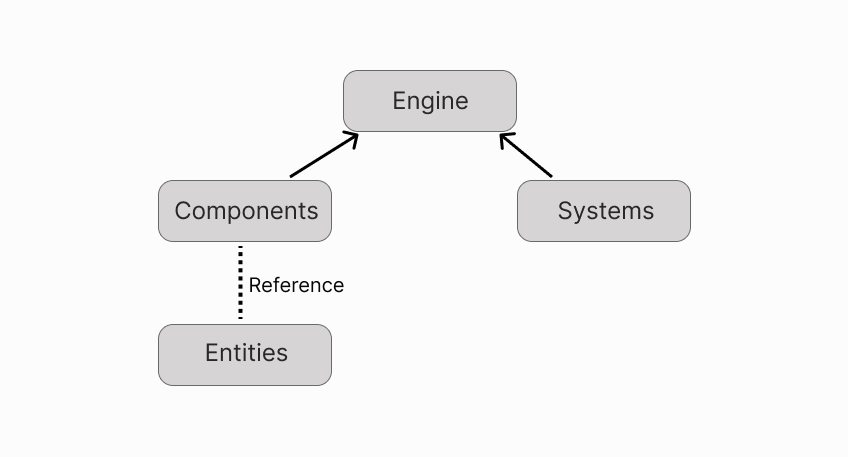
Decentraland scenes are built around entities, components and systems. This is a common pattern used in the architecture of several game engines, that allows for easy composability and scalability.
Overview
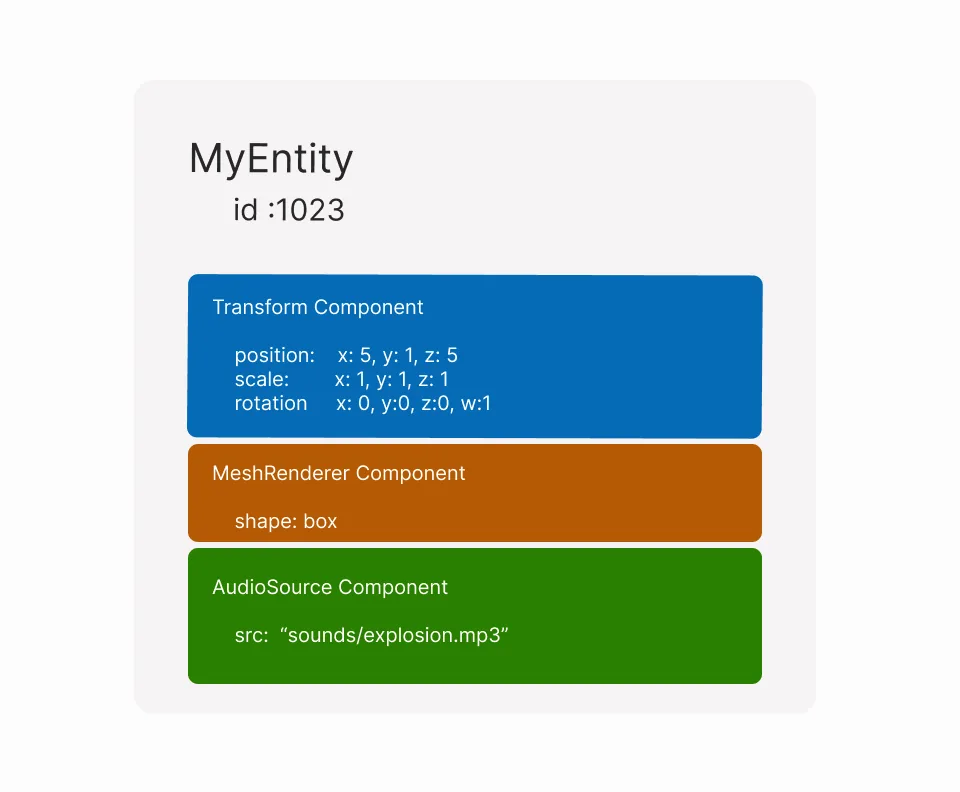
Entities are the basic unit for building everything in Decentraland scenes. All visible and invisible 3D objects and audio players in your scene will each be an entity. An entity is nothing more than an id, that can be referenced by components. The entity itself has no properties or methods of its own, it simply serves to group several components together.
Components define the traits of an entity. For example, a Transform component stores the entity's coordinates, rotation and scale. A MeshRenderer component gives the entity a visible shape (like a cube or a sphere) when rendered in the scene, a Material component gives the entity a color or texture. You can also create custom components to serve your scene's required data, for example a custom health could store an entity's remaining health value, and add it to entities that represent non-player enemies in a game.
If you're familiar with web development, think of entities as the equivalent of Elements in a DOM tree, and of components as attributes of those elements.
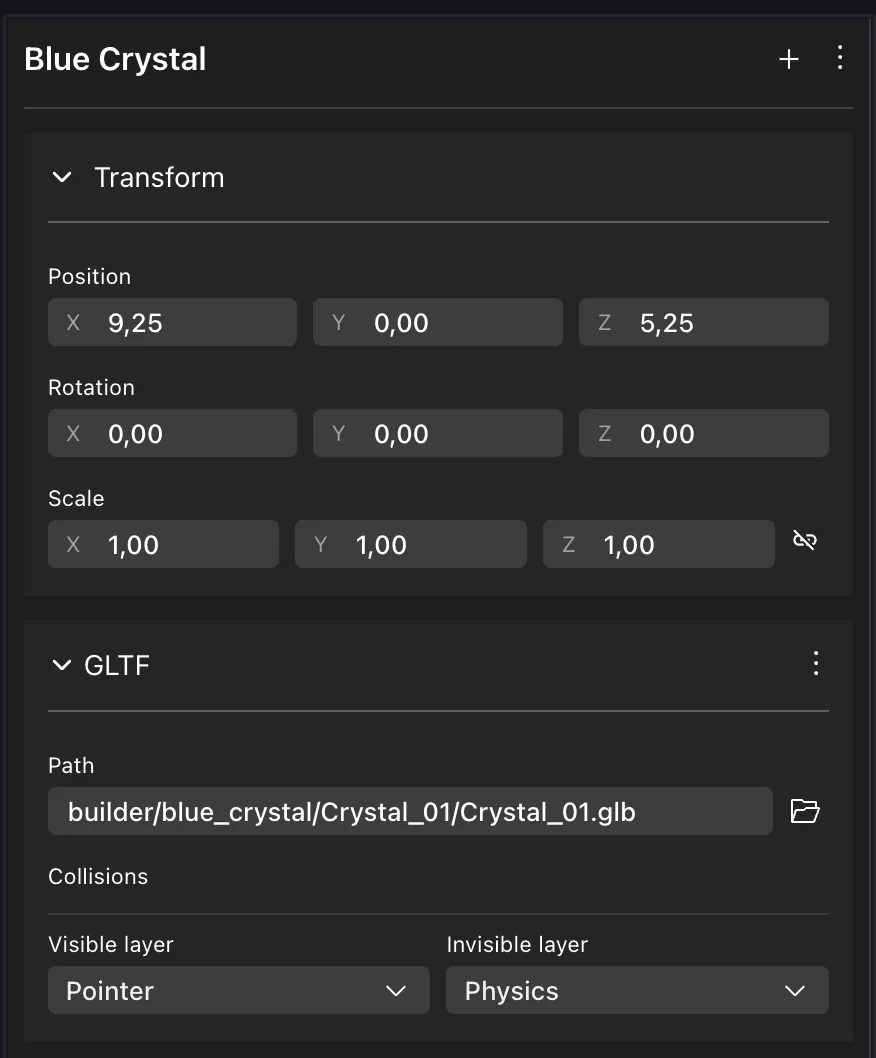
In the Scene Editor in Creator Hub, you can view the components that belong to an entity by selecting it.
📔 Note: In previous versions of the SDK, Entities were objects that were instanced, and could be extended to add functions. As of version 7.0 of the SDK, entities are only an ID. This structure better fits the principles of data oriented programming and can help in the scene's performance.
Components like Transform, Material or any of the shape components are closely tied in with the rendering of the scene. If the values in these components change, that alone is enough for the engine to change how the scene is rendered in the next frame.
The engine is the part of the scene that sits in the middle and manages all of the other parts. It determines what entities are rendered and how players interact with them. It also coordinates what functions from systems are executed and when.
Components are meant to store data about their referenced entity. They can only store this data, they can't modify this data themselves. All changes to the values in the components are carried out by Systems. Systems are completely decoupled from the components and entities themselves. Entities and components are agnostic to what systems are acting upon them.
Syntax for entities and components
The example below shows some basic operations for declaring, and configuring basic entities and components.
export function main() {
    // Create an entity
    const door = engine.addEntity()

    // Give the entity a position via a transform component
    Transform.create(door, {
        position: Vector3.create(5, 1, 5),
    })

    // Give the entity a visible shape via a GltfContainer component
    GltfContainer.create(door, {
        src: 'assets/models/door.glb',
    })
}
📔 Note: In previous versions of the SDK, it was necessary to manually add an entity to the engine to start rendering it. As of version 7 of the SDK, entities are implicitly added to the engine as soon as they are assigned a component.
When a component is created, it's always assigned to a parent entity. The component's values then affect the entity.
💡 Tip: Instead of creating entities one by one, you can spawn a whole tree of entities and components at once from a composite file.
Remove entities
To remove an entity from the engine, use engine.removeEntity(). This function returns a boolean: true if the entity was removed, false if the removal was refused.
export function main() {
    // Create an entity
    const door = engine.addEntity()

    // Give the entity a visible shape via a GltfContainer component
    GltfContainer.create(door, {
        src: 'assets/models/door.glb',
    })

    // Remove entity
    const removed = engine.removeEntity(door)
    console.log('Entity removed:', removed) // true
}
If a removed entity has any child entities, these change their parent back to the default engine.RootEntity entity, which is positioned at the scene base position, with a scale of 1.
Renderer-reserved entities
Some entity ids are reserved by the renderer for remote player avatars. You cannot remove these entities. If you call engine.removeEntity() on a renderer-reserved entity, it returns false and leaves all components untouched.
The named reserved entities (engine.RootEntity, engine.PlayerEntity, engine.CameraEntity) are a special case: engine.removeEntity() still returns false for these (their ids are never released), but their components are purged. This means you can clear your own components from them (for example, removing an InputModifier from engine.PlayerEntity), even though the entity id itself is never freed.
// Attempting to remove a reserved entity
const result = engine.removeEntity(engine.PlayerEntity)
console.log(result) // false — the entity id is not released
// But the scene's own components on PlayerEntity are purged
You can check the return value when removing entities to handle edge cases:
if (!engine.removeEntity(someEntity)) {
    console.log('Entity could not be removed (reserved)')
}
Remove an entity with its children
To remove an entity and also all of its children (and any children of its children, recursively), use the removeEntityWithChildren() helper.
export function main() {
    // Create parent entity
    const door = engine.addEntity()

    // Create child entity
    const doorKnob = engine.addEntity()

    // Give the entities a visible shape
    GltfContainer.create(door, {
        src: 'models/door.glb',
    })
    GltfContainer.create(doorKnob, {
        src: 'models/doorKnob.glb',
    })

    // Parent
    Transform.create(doorKnob, {
        parent: door,
    })

    // Remove both parent and children
    removeEntityWithChildren(engine, door)
}
Note: If a renderer-reserved entity sits anywhere in the tree, removeEntityWithChildren removes all the other descendants but leaves the reserved entity in place. The reserved entity's Transform.parent will point at a removed entity. This only happens if your scene parents a reserved entity under a scene entity, which is uncommon.
💡 Tip: Instead of removing an entity from the engine, in some cases it might be better to make it invisible, in case you want to be able to load it again without any delay. See Make invisible
Removing entities behind the scenes
An entity is just an id that is referenced by its components. So when removing an entity you're really removing each of the components that reference this entity. If you manually remove all of the components of an entity, it will look the same to the player as doing engine.removeEntity(). However, engine.removeEntity() also performs some extra internal bookkeeping, marking the entity id as no longer in use, so it's always the recommended way to remove an entity.
Nested entities
An entity can have other entities as children. Thanks to this, we can arrange entities into trees, just like the HTML of a webpage.
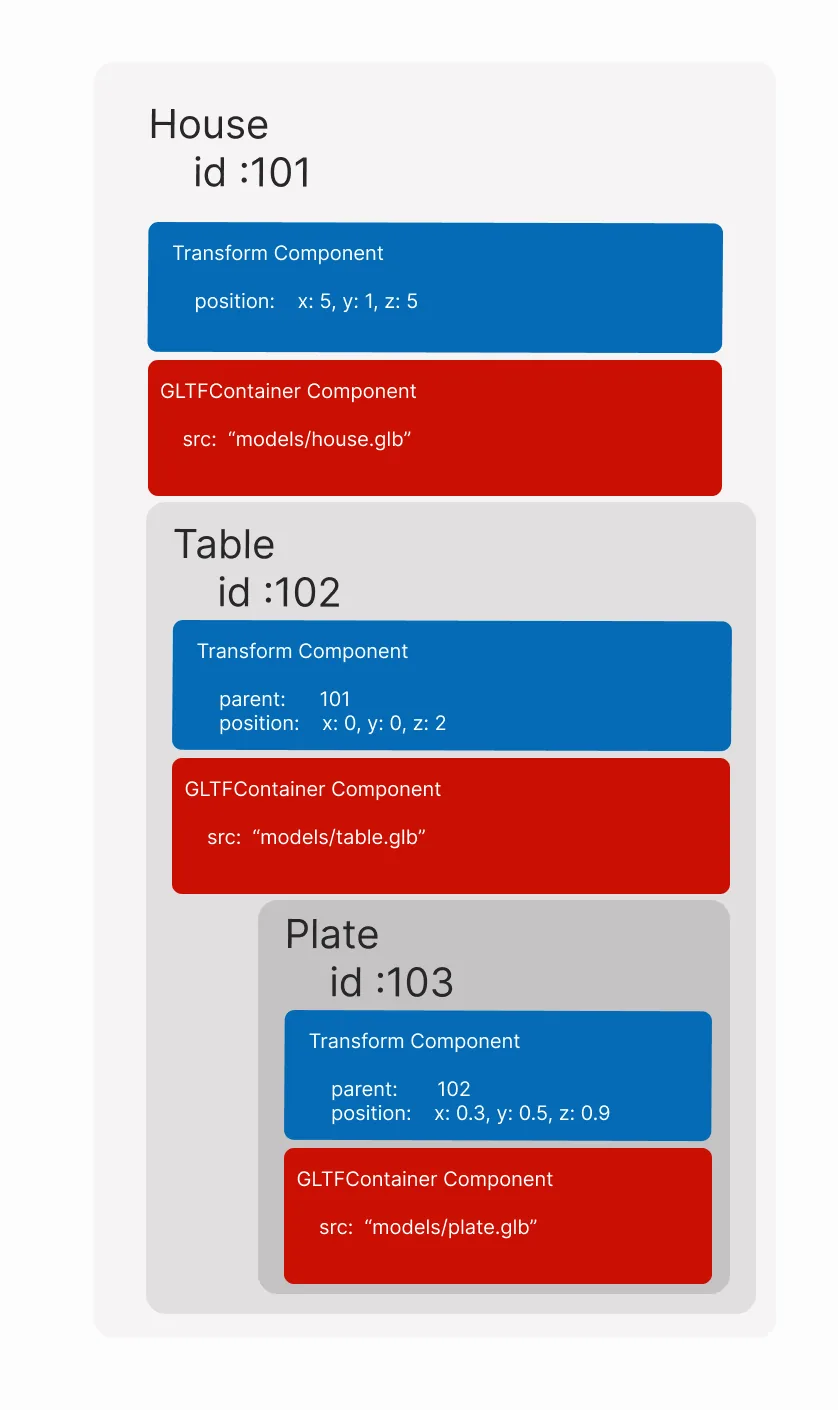
To set an entity as the parent of another, the child entity must have a Transform component. You can then set the parent field with a reference to the parent entity.
export function main() {
    // Create entities
    const parentEntity = engine.addEntity()

    const childEntity = engine.addEntity()

    // Set parent
    Transform.create(childEntity, {
        parent: parentEntity,
    })
}
Once a parent is assigned, it can be read off the child entity from the parent field on its Transform component.
// Get parent from an entity
const parent = Transform.get(childEntity).parent
If a parent entity has a Transform component that affects its position, scale or rotation, its children entities are also affected. Any position or rotation values are added, any scale values are multiplied.
If either the parent or child entity doesn't have a Transform component, the following default values are used.
- For position, the parent's center is 0, 0, 0
- For rotation the parent's rotation is the quaternion 0, 0, 0, 1 (equivalent to the Euler angles 0, 0, 0)
- For scale, the parent is considered to have a size of 1. Any resizing of the parent affects scale and position in proportion.
Entities with no shape component are invisible in the scene. These can be used as wrappers to handle and position multiple entities as a group.
To separate a child entity from its parent, you can assign the entity's parent to engine.RootEntity.
const mutableChildTransform = Transform.getMutable(childEntity)
mutableChildTransform.parent = engine.RootEntity
📔 Note: When dealing with nested entities that are synced with other players, use the parentEntity() function instead of the parent entity in the Transform. See Parented entities
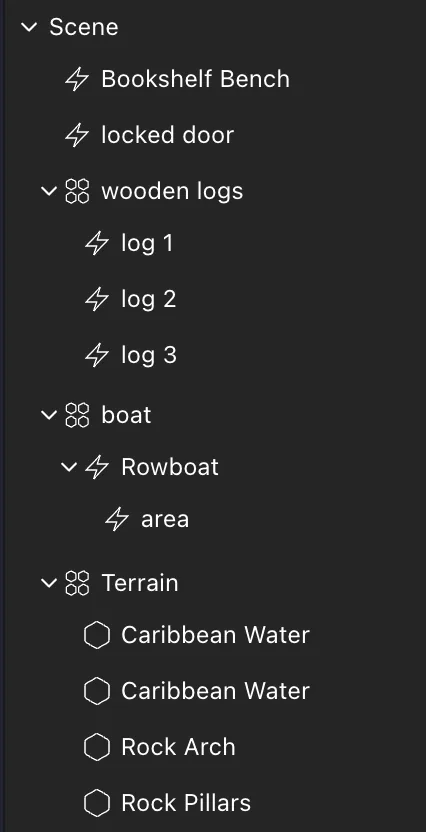
In the Scene Editor, you can see the entire hierarchy of nested entities in your scene on the left-side panel.
Get an entity by ID
Every entity in your scene has a unique number id. You can retrieve a component that refers to a specific entity from the engine based on this ID.
// fetch a Transform component
Transform.get(1000 as Entity)
📔 Note: The entity ids between 0 and 511 are reserved by the engine for fixed entities, like the player avatar, the base scene, etc.
For example, if a player's click or a raycast hits an entity, this will return the id of the hit entity, and you can use the command above to fetch the Transform component of the entity that matches that id. You can also fetch any other component of that entity in the same way.
Get an entity by name
When adding entities via drag-and-drop in the Scene Editor, each entity has a unique name. Use the engine.getEntityOrNullByName() function to reference one of these entities from your code. Pass the entity's name as a string, as written on the Scene Editor's UI, in the tree view on the left.
function main() {
    const door = engine.getEntityOrNullByName('door3')
}
📔 Note: Make sure you only use engine.getEntityOrNullByName() inside the main() function, in functions that run after main(), or in a system. If used outside one of those contexts, the entities created in the Scene Editor UI may not yet be instanced.
You're free to perform any action on an entity fetched via this method, like add or remove components, modify values of existing components, or remove the entity from the engine.
function main() {
    // fetch entity
    const door = engine.getEntityOrNullByName('door-3')
    // verify that the entity exists
    if (door) {
        // add a pointer events callback
        pointerEventsSystem.onPointerDown(
            {
                entity: door,
                opts: { button: InputAction.IA_PRIMARY, hoverText: 'Open' },
            },
            function () {
                // open door
            }
        )
    }
}
All the entities added via the Scene Editor UI have a Name component, you can iterate over all of them like this:
function main() {
    for (const [entity, name] of engine.getEntitiesWith(Name)) {
        console.log({ entity, name })
    }
}
Add or replace a component
Each entity can only have one component of a given kind. For example, if you attempt to assign a Transform to an entity that already has one, this will cause an error.
To prevent this error, you can use .createOrReplace instead of .create. This command overwrites any existing components of the same kind if they exists, otherwise it creates a new component just like .create.
Transform.createOrReplace(door, {
    position: Vector3.create(5, 1, 5),
})
📔 Note: Since .createOrReplace runs an additional check before creating the component, it's always more performant to use .create. If you're sure that the entity doesn't already have a component like the one you're adding, use .create.
Access a component from an entity
You can access components of an entity by using the entity's .get() or the getMutable() functions.
export function main() {
    // Create entity
    const box = engine.addEntity()

    // Create and add component to that entity
    Transform.create(box)

    // Get read-only version of component
    let transform = Transform.get(box)

    // Get mutable version of component
    let transform = Transform.getMutable(box)
}
The get() function fetches a read-only reference to the component. You cannot change any values from this reference of the component.
If you wish to change the values of the component, use the getMutable() function instead. If you change the values in the mutable version of the component, you're directly affecting the entity that component belongs to.
See mutable data for more details.
📔 Note: Only use getMutable() if you're actually going to make changes to the component's values. Otherwise, always use get(). This practice follows the principles of data oriented programming, and can significantly help in the scene's performance.
// Get mutable version of component
let transform = Transform.getMutable(box)

// change a value of the component
transform.scale.x = 5
The example above directly modifies the value of the x scale on the Transform component.
If you're not entirely sure if the entity does have the component you're trying to retrieve, use getOrNull() or getMutableOrNull().
📔 Note: Avoid using getOrNull() or getMutableOrNull() when possible, as these functions involve additional checks that and are therefore less efficient than .get() and getMutable().
//  getOrNull
const transformOrNull = Transform.getOrNull(myEntity)

//  getMutableOrNull
const mutableTransformOrNull = Transform.getMutableOrNull(myEntity)
If the component you're trying to retrieve doesn't exist in the entity:
get()andgetMutable()returns an error.getOrNull()andgetMutableOrNull()returnsNull.
Remove a component from an entity
To remove a component from an entity, use the entity's deleteFrom() method of the component type.
Transform.deleteFrom(myEntity)
If you attempt to remove a component that doesn't exist in the entity, this action won't raise any errors.
📔 Note: To remove all the components of an entity at once, see this section
Check for a component
You can check if an entity owns an instance of a certain component by using the has() function. This function returns true if the component is present, and false if it's not. This can be very handy for using in conditional logic in your scene.
const hasTransform = Transform.has(myEntity)
💡 Tip: You can also query components to fetch a full list of components that hold a specific component, or a specific set of components. Do not iterate over all entities in the scene manually to check each with a has(), that approach is a lot less efficient.
Check for changes on a component
Use the onChange function to run a callback function any time that the values of the component change for a given entity. This works on any component, and is a great shortcut for helping keep your code readable.
The callback function can include an input parameter that contains the new state of the component.
Transform.onChange(cubeEntity, (newTransform) => {
    if (!newTransform) return
    console.log(
        'Cube position changed: ',
        newTransform.position,
        newTransform.rotation
    )
})

VisibilityComponent.onChange(cubeEntity, (newVisibilityComponent) => {
    if (!newVisibilityComponent) return
    console.log('Cube visibility changed: ', newVisibilityComponent.visible)
})
If the component is removed from the entity, then the function is called with an input of undefined.
💡 Tip: The .onChange() function works both with native components of the SDK and with custom components defined by the creator.
Get child entities
To access all the entities that are direct children of a parent entity, use getEntitiesWithParent. It takes as its arguments the engine and the parent entity and returns a list of all the entities that have that particular entity as its parent. Note that it only returns direct children, not children of children.
import { getEntitiesWithParent } from '@dcl/sdk/ecs'

const children = getEntitiesWithParent(engine, myEntity)
for (const child of children) {
   // process each child entity
}
To instead access all the descendants of an entity, regardless of how deeply nested they are, use the function getComponentEntityTree(). Instead of manually traversing the hierarchy level by level, this function returns a flat list of all descendants that is easy to iterate over. It also filters to only entities that have a given component or list of components.
import { getComponentEntityTree } from '@dcl/sdk/ecs'

export function main() {
    // Create a parent entity with nested children
    const parentEntity = engine.addEntity()
    Transform.create(parentEntity, {
        position: Vector3.create(8, 0, 8),
    })

    // ... assume the parent has multiple children and grandchildren

    // Iterate over all descendants of the parent entity
    for (const descendantEntity of getComponentEntityTree(
        engine,
        parentEntity,
        Transform
    )) {
        // Access each descendant entity
        const transform = Transform.get(descendantEntity)
        console.log('Descendant position:', transform.position)
    }
}
The getComponentEntityTree function takes three parameters:
engine: The engine instance running the entitiesentity: The root entity to start fromcomponent: The component to filter by (typicallyTransformfor spatial hierarchies)
The function returns a generator that yields each descendant entity in the tree structure. Only entities that have the specified component will be included in the results.
You can combine this with other component checks to find specific entities in your hierarchy:
// Find all descendants with a specific name
for (const descendantEntity of getComponentEntityTree(
    engine,
    parentEntity,
    Transform
)) {
    const name = Name.getOrNull(descendantEntity)
    if (name && name.value === 'targetEntity') {
        console.log('Found target entity:', descendantEntity)
    }
}
Reserved entities
Certain entity ids are reserved for special entities that exist in every scene. They can be accessed via the following aliases:
engine.RootEntityengine.PlayerEntityengine.CameraEntity
📔 Note: Avoid referring to these entities before they are initialized. To avoid this problem, refer to these entities in the main() function, or in a system.
The root entity
All entities in the scene are children of the engine.RootEntity, directly or indirectly.
This entity lacks a Transform component, but it's used to handle several components that represent more global settings, like skybox control, cursor position, or screen dimensions.
The player entity
The engine.PlayerEntity entity represents the player's avatar.
Fetch the player's Transform component to get the player's current position and rotation, see user data. The player's Transform is read-only, to modify it use the movePlayerTo() function, learn more.
You can also attach objects to the player by setting them as children of this entity, although the Attach to Player is often the better option for htat.
The camera entity
The engine.CameraEntity entity represents the player's camera.
Fetch the camera's Transform component to get the camera's position and rotation. This entity's Transform is also read-only. To modify the camera angle or position, use a Virtual camera.
You can also fetch the camera's CameraMode component to know know if the player is using 1st or 3rd person camera mode, see camera mode.