'/%3e%3cpath%20fill-rule='evenodd'%20clip-rule='evenodd'%20d='M18%2080.9996C25.515%2086.6471%2034.875%2089.9996%2045%2089.9996C55.125%2089.9996%2064.485%2086.6471%2072%2080.9996H18Z'%20fill='%23FF2D55'/%3e%3cpath%20fill-rule='evenodd'%20clip-rule='evenodd'%20d='M9.00008%2071.9996C11.5651%2075.3971%2014.6026%2078.4346%2018.0001%2080.9996H72C75.3975%2078.4346%2078.435%2075.3971%2081%2071.9996H9.00008Z'%20fill='%23FFA25A'/%3e%3cpath%20fill-rule='evenodd'%20clip-rule='evenodd'%20d='M60.3675%2062.9997H3.75757C5.15257%2066.2172%206.93007%2069.2322%209.00006%2071.9997H60.39V62.9997H60.3675Z'%20fill='%23FFC95B'/%3e%3cpath%20fill-rule='evenodd'%20clip-rule='evenodd'%20d='M31.8826%2029.2496V62.9996H60.0075L31.8826%2029.2496Z'%20fill='url(%23paint1_linear_1_49380)'/%3e%3cpath%20fill-rule='evenodd'%20clip-rule='evenodd'%20d='M3.75757%2062.9997H31.8826V29.2497L3.75757%2062.9997Z'%20fill='white'/%3e%3cpath%20fill-rule='evenodd'%20clip-rule='evenodd'%20d='M60.3675%2047.25V72H81L60.3675%2047.25Z'%20fill='url(%23paint2_linear_1_49380)'/%3e%3cpath%20fill-rule='evenodd'%20clip-rule='evenodd'%20d='M39.7574%2072H60.3674V47.25L39.7574%2072Z'%20fill='white'/%3e%3cpath%20fill-rule='evenodd'%20clip-rule='evenodd'%20d='M60.3675%2040.4997C66.5807%2040.4997%2071.6175%2035.4629%2071.6175%2029.2497C71.6175%2023.0365%2066.5807%2017.9997%2060.3675%2017.9997C54.1543%2017.9997%2049.1175%2023.0365%2049.1175%2029.2497C49.1175%2035.4629%2054.1543%2040.4997%2060.3675%2040.4997Z'%20fill='%23FFC95B'/%3e%3cpath%20fill-rule='evenodd'%20clip-rule='evenodd'%20d='M31.8824%2022.4997C34.989%2022.4997%2037.5074%2019.9813%2037.5074%2016.8747C37.5074%2013.7681%2034.989%2011.2497%2031.8824%2011.2497C28.7758%2011.2497%2026.2574%2013.7681%2026.2574%2016.8747C26.2574%2019.9813%2028.7758%2022.4997%2031.8824%2022.4997Z'%20fill='%23FFC95B'/%3e%3cdefs%3e%3clinearGradient%20id='paint0_linear_1_49380'%20x1='45'%20y1='-18.6396'%20x2='-18.6396'%20y2='45'%20gradientUnits='userSpaceOnUse'%3e%3cstop%20stop-color='%23FF2D55'/%3e%3cstop%20offset='1'%20stop-color='%23FFBC5B'/%3e%3c/linearGradient%3e%3clinearGradient%20id='paint1_linear_1_49380'%20x1='31.8731'%20y1='29.2497'%20x2='31.8731'%20y2='62.9996'%20gradientUnits='userSpaceOnUse'%3e%3cstop%20stop-color='%23A524B3'/%3e%3cstop%20offset='1'%20stop-color='%23FF2D55'/%3e%3c/linearGradient%3e%3clinearGradient%20id='paint2_linear_1_49380'%20x1='60.3605'%20y1='47.25'%20x2='60.3605'%20y2='72'%20gradientUnits='userSpaceOnUse'%3e%3cstop%20stop-color='%23A524B3'/%3e%3cstop%20offset='1'%20stop-color='%23FF2D55'/%3e%3c/linearGradient%3e%3c/defs%3e%3c/svg%3e)
UI Input Binding
Bind input actions to your own UI elements so they drive player input.
UiInputBinding turns any UI element into a control button. Bind an element to one or more InputActions, and while it's pressed — by touch or pointer — those actions are held down, driving both the local player's input (movement, jumping) and any scene InputAction listeners, exactly like the native on-screen buttons.
Use it to build your own touch controls. It's typically paired with On-screen Controls: hide the native buttons, then put your own in their place.
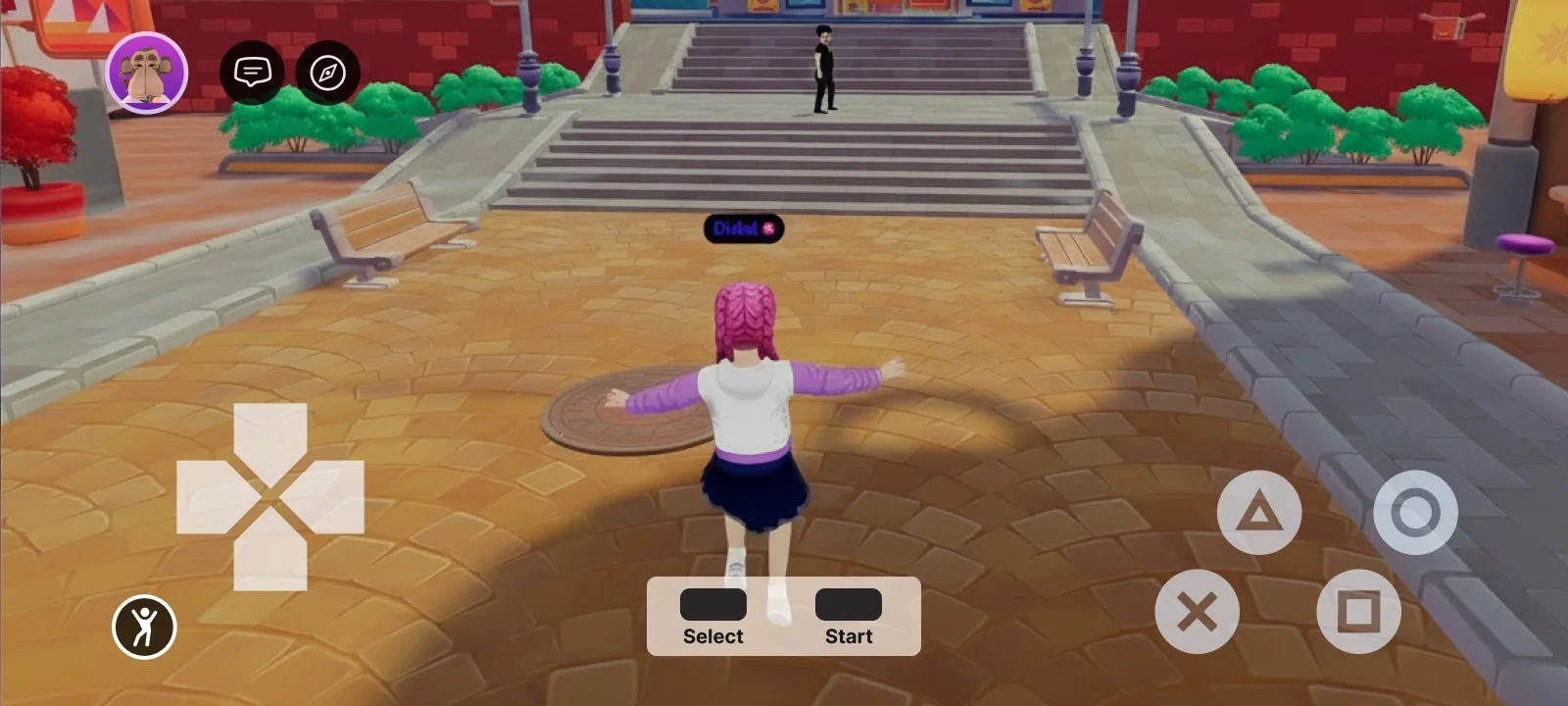
A fully custom gamepad built from UI elements — each button is a UI entity bound to an input action
Bind an action to a UI element
Add a uiInputBinding prop to any element in your .tsx UI and list the actions to hold while it's pressed. The prop is available on every UI element (UiEntity, Button, Label, …), just like uiTransform and uiBackground.
A button that moves the player forward while held:
import { InputAction } from '@dcl/sdk/ecs'
import { Button } from '@dcl/sdk/react-ecs'

export const forwardButton = () => (
    <Button
        value="▲"
        uiTransform={{ width: 100, height: 100 }}
        uiInputBinding={{ actions: [InputAction.IA_FORWARD] }}
    />
)
Build a custom control cluster
Combine several bound elements to assemble a full control scheme.
A movement button plus an action button that fires IA_PRIMARY:
import { InputAction } from '@dcl/sdk/ecs'
import { Button, UiEntity } from '@dcl/sdk/react-ecs'

export const customControls = () => (
    <UiEntity uiTransform={{ width: 240, height: 120 }}>
        <Button
            value="▲"
            uiTransform={{ width: 100, height: 100 }}
            uiInputBinding={{ actions: [InputAction.IA_FORWARD] }}
        />
        <Button
            value="Use"
            uiTransform={{ width: 100, height: 100 }}
            uiInputBinding={{ actions: [InputAction.IA_PRIMARY] }}
        />
    </UiEntity>
)
The bound actions behave just like the native buttons: IA_FORWARD / IA_BACKWARD / IA_LEFT / IA_RIGHT move the avatar, and any action can be read by your scene's InputAction listeners. Removing the prop (or the component) releases the binding.
Properties
| Property | Type | Description |
|---|---|---|
actions |
array of InputAction |
The input actions held down while this element is pressed. See Click events for the full list of InputAction values. |
Pair this with TouchScreenControls to hide the native controls and replace them with your own touch UI — the recommended way to ship a fully custom control scheme.