'/%3e%3cpath%20fill-rule='evenodd'%20clip-rule='evenodd'%20d='M18%2080.9996C25.515%2086.6471%2034.875%2089.9996%2045%2089.9996C55.125%2089.9996%2064.485%2086.6471%2072%2080.9996H18Z'%20fill='%23FF2D55'/%3e%3cpath%20fill-rule='evenodd'%20clip-rule='evenodd'%20d='M9.00008%2071.9996C11.5651%2075.3971%2014.6026%2078.4346%2018.0001%2080.9996H72C75.3975%2078.4346%2078.435%2075.3971%2081%2071.9996H9.00008Z'%20fill='%23FFA25A'/%3e%3cpath%20fill-rule='evenodd'%20clip-rule='evenodd'%20d='M60.3675%2062.9997H3.75757C5.15257%2066.2172%206.93007%2069.2322%209.00006%2071.9997H60.39V62.9997H60.3675Z'%20fill='%23FFC95B'/%3e%3cpath%20fill-rule='evenodd'%20clip-rule='evenodd'%20d='M31.8826%2029.2496V62.9996H60.0075L31.8826%2029.2496Z'%20fill='url(%23paint1_linear_1_49380)'/%3e%3cpath%20fill-rule='evenodd'%20clip-rule='evenodd'%20d='M3.75757%2062.9997H31.8826V29.2497L3.75757%2062.9997Z'%20fill='white'/%3e%3cpath%20fill-rule='evenodd'%20clip-rule='evenodd'%20d='M60.3675%2047.25V72H81L60.3675%2047.25Z'%20fill='url(%23paint2_linear_1_49380)'/%3e%3cpath%20fill-rule='evenodd'%20clip-rule='evenodd'%20d='M39.7574%2072H60.3674V47.25L39.7574%2072Z'%20fill='white'/%3e%3cpath%20fill-rule='evenodd'%20clip-rule='evenodd'%20d='M60.3675%2040.4997C66.5807%2040.4997%2071.6175%2035.4629%2071.6175%2029.2497C71.6175%2023.0365%2066.5807%2017.9997%2060.3675%2017.9997C54.1543%2017.9997%2049.1175%2023.0365%2049.1175%2029.2497C49.1175%2035.4629%2054.1543%2040.4997%2060.3675%2040.4997Z'%20fill='%23FFC95B'/%3e%3cpath%20fill-rule='evenodd'%20clip-rule='evenodd'%20d='M31.8824%2022.4997C34.989%2022.4997%2037.5074%2019.9813%2037.5074%2016.8747C37.5074%2013.7681%2034.989%2011.2497%2031.8824%2011.2497C28.7758%2011.2497%2026.2574%2013.7681%2026.2574%2016.8747C26.2574%2019.9813%2028.7758%2022.4997%2031.8824%2022.4997Z'%20fill='%23FFC95B'/%3e%3cdefs%3e%3clinearGradient%20id='paint0_linear_1_49380'%20x1='45'%20y1='-18.6396'%20x2='-18.6396'%20y2='45'%20gradientUnits='userSpaceOnUse'%3e%3cstop%20stop-color='%23FF2D55'/%3e%3cstop%20offset='1'%20stop-color='%23FFBC5B'/%3e%3c/linearGradient%3e%3clinearGradient%20id='paint1_linear_1_49380'%20x1='31.8731'%20y1='29.2497'%20x2='31.8731'%20y2='62.9996'%20gradientUnits='userSpaceOnUse'%3e%3cstop%20stop-color='%23A524B3'/%3e%3cstop%20offset='1'%20stop-color='%23FF2D55'/%3e%3c/linearGradient%3e%3clinearGradient%20id='paint2_linear_1_49380'%20x1='60.3605'%20y1='47.25'%20x2='60.3605'%20y2='72'%20gradientUnits='userSpaceOnUse'%3e%3cstop%20stop-color='%23A524B3'/%3e%3cstop%20offset='1'%20stop-color='%23FF2D55'/%3e%3c/linearGradient%3e%3c/defs%3e%3c/svg%3e)
Scene Limitations
How many things can I put on my scene?
In order to improve performance in the metaverse, we have established a set of limits that every scene must follow. These limits are per-parcel. So the larger the scene, the higher these limits are set.
When working with the Creator Hub, you can see stats about the resources used by 3D models in your scene, together with the limits for your scene.

You can expand this menu to view details.
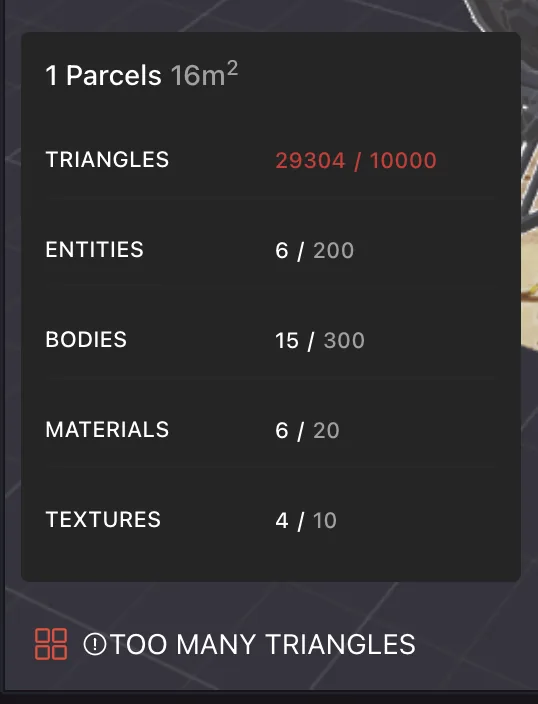
💡 Tip: For a reference table of all specific numbers per parcel count, see:
Scene limitation rules
Below are the maximum number of elements that a scene is allowed to render at the same time:
n represents the number of parcels that a scene occupies.
Triangles:
n x 10000Total amount of triangles for all the models in the scene.Entities:
n x 200Amount of entities in the scene.Bodies:
n x 300Amount of meshes in the scene.Materials:
log2(n+1) x 20Amount of materials in the scene. It includes materials imported as part of models.Textures:
log2(n+1) x 10Amount of textures in the scene. It includes textures imported as part of models.Height:
330 metersMaximum height of the scene, regardless of how many parcels it occupies.Warning: Entities placed higher than 200 meters may suffer multiplayer sync issues. Keep any content that players interact with or that is synced between players below that height.
Important: Only entities that are currently being rendered in the scene are counted for these limits. If your scene switches between 3D models, what matters is the rendered models at any point in time, not the total sum. Player avatars and any items brought by a player from outside the scene don't count for calculating these limits either.
Total file size: In Genesis City -
15 MB per parcel - 300 MB max. For Worlds, see World size. Total size of the files uploaded to the content server. Includes 3D models and audio. Doesn't include files that aren't uploaded, such as node.js packages. You can see the full list of files being published and their sizes before you confirm a deployment.File count:
200 files per parcelTotal count of the files uploaded. Includes 3D models and audio. Doesn't include files that aren't uploaded, such as node.js packages.Max file size
50 MB per fileNo individual file of any type in the scene can exceed 50 MB. Small scenes are restricted further because the file mustn't exceed their Total File Size limit (For example, a single-parcel scene is limited to 15 MB total).
📔 Note: The file size and file count limits are enforced when deploying, exceeding them blocks the deployment. The other limits (triangles, entities, bodies, materials, textures, height) are soft limits: they're reported as warnings by the Creator Hub, but exceeding them mostly results in degraded performance rather than a hard failure. Treat them as strong recommendations.
💡 Tip: Not all files in your scene project folder count for the file size limit, only those that are uploaded to servers. All of the contents of the node_modules folder, which are very large, are dependencies that are not uploaded and therefore don't count. The same applies to any files in the /src folder, since the source code is not uploaded.
You can list any other files or folders you want to exclude from being uploaded in the .dclignore file in your project.
Optimizing
See Performance Optimization for tips about how you can keep your scene below these limits and make it run smoother for players.
📱 Mobile: The hard limits on this page apply to all clients, but mobile devices have less headroom than desktop. Aim to stay comfortably below these limits when targeting the mobile app, and prefer fewer triangles, fewer materials, and smaller textures.
Scene boundaries
When running a preview, any content that is located outside the parcel boundaries is highlighted in red when rendered. If any content is outside these boundaries, that part of your content won't be rendered when players visit your scene.
If the tip of a large object leaves the boundaries, this tip will be sliced off the object.
A single parcel scene measures 16 meters x 16 meters. If the scene has multiple parcels, the dimensions vary depending on the arrangement of the parcels.
It's possible to position entities underground, to either hide them or to have only a portion of them emerge. A scene can't have tunnels that go below the default ground height, players can't travel below the y = 0 height.
Shader limitations
3D models used in decentraland must use supported shaders and materials. See 3D model materials for a list of supported shaders.
Mesh compression
📱 Draco-compressed meshes on the mobile client require asset optimization. glTF/GLB models that use Draco mesh compression load on the Decentraland mobile app only after they've been processed through the asset optimization pipeline. If your Draco-compressed models fail to load on mobile, verify they've been optimized — or export your models without Draco compression to avoid the step entirely. Other forms of glTF optimization (quantization, texture compression, mesh decimation) are unaffected.
Lighting
The scene's lighting conditions can't be changed for all players from the default setting, although each individual player is free to change their own skybox settings from the Explorer UI.
Texture size constraints
Texture sizes must use width and height numbers (in pixels) that match the following numbers:
1, 2, 4, 8, 16, 32, 64, 128, 256, 512, 1024
This sequence is made up of powers of two:
f(x) = 2 ^ x. 1024 is the maximum number we allow for a texture size, textures larger than that are scaled down by the asset bundle conversion process. This is a fairly common requirement among other rendering engines, it's there due internal optimizations of the graphics processors.
The width and height don't need to have the same number, but they both need to belong to this sequence.
The recommended size for textures is 1024x1024, we have found this to be the optimal size to be transported through domestic networks and to provide reasonable loading/quality experiences.
Examples of other valid sizes:
32x32
64x32
512x256
512x512
1024x1024
📔 Note: Although textures of arbitrary sizes sometimes work, they are also often rendered with bugs and are more unstable. We strongly advise that all your textures match these sizes.
World Size
Decentraland Worlds have different limitations, since they are loaded as single scenes.
- Worlds published to Decentraland NAMEs draw from a storage budget that is shared across all the Worlds owned by the same wallet. Each NAME you own grants
100 MB, each LAND parcel grants an additional100 MB, and every 2,000 MANA held grants another100 MB. You can distribute this budget between your Worlds however you like. - Worlds published to ENS domains have a limit of
36 MBthat cannot be expanded.
You can check how much of your budget is used and how much remains in the Manage section of the Creator Hub, or in the Worlds tab of the Builder. If you exceed your budget (for example after selling or transferring assets), you have 48 hours to free up space before your Worlds become inaccessible.
See Worlds Size Limit for more details.
Total size of the files uploaded to the content server. Includes 3D models and audio. Doesn't include files that aren't uploaded, such as node.js packages. You can see the full list of files being published and their sizes before you confirm a deployment.
All other limits in worlds are per parcel, including triangles, materials, etc. Since adding more parcels to a world is free, you can add up to 300x300 parcels (90,000 total) to your scene, and have the corresponding limits to that parcel count.